Import your matches
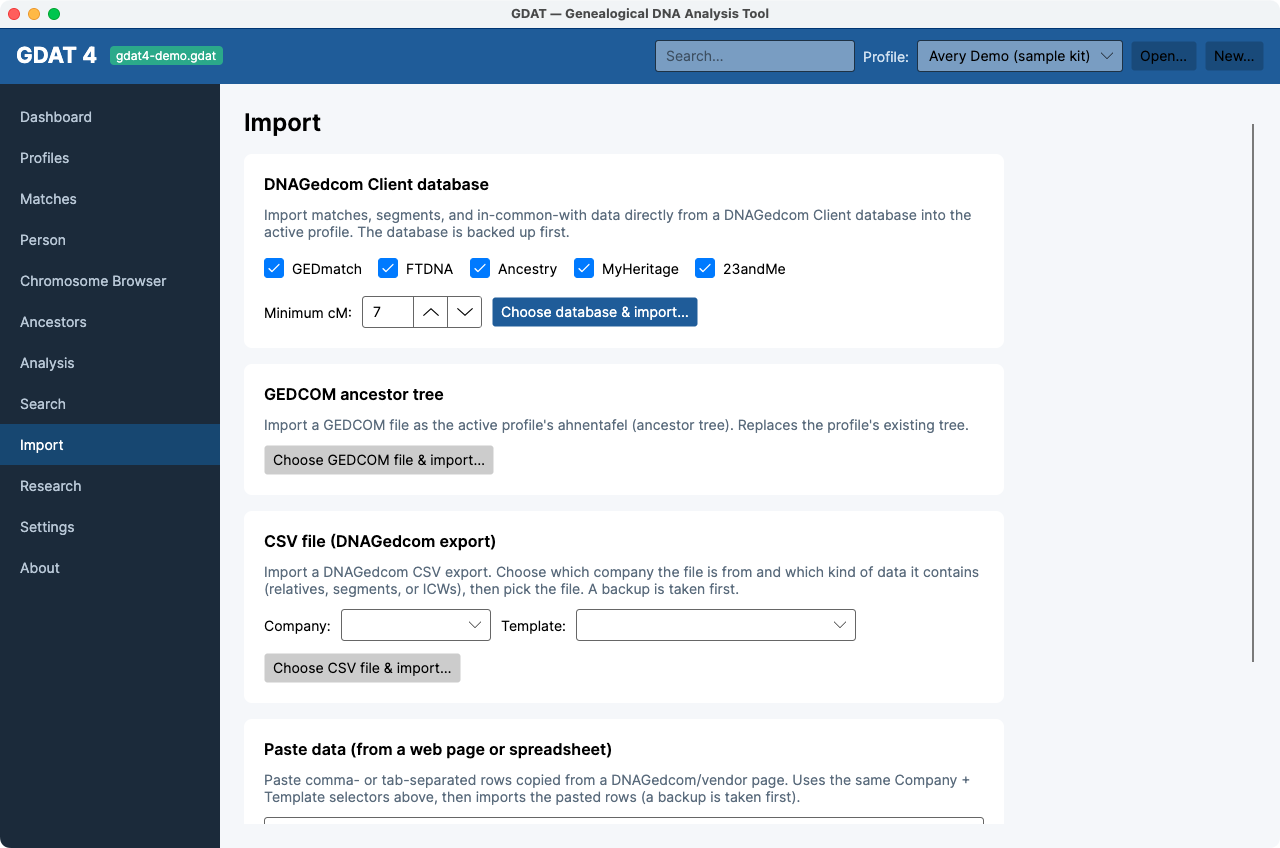
Everything in GDAT 4 starts with data. The Import workspace brings your matches, shared segments, in-common-with data, and ancestor trees into the active profile. There are four import paths — use whichever matches how you gathered your data.
Before you import: pick the right kit in the top-bar
Profile selector. Imports go into the active profile. Everything is backed up
first, automatically.
Choose your import path
1. DNAGedcom Client database (recommended)
If you use the DNAGedcom Client to gather your matches, this is the richest path — it brings in matches, segments, and in-common-with (ICW) data in one step.
- In Import, find the DNAGedcom Client database card.
- Tick the vendors you want to include (GEDmatch, FTDNA, Ancestry, MyHeritage, 23andMe — all on by default).
- Set Minimum cM (default 7) to skip the smallest, noisiest matches.
- Click Choose database & import… and pick your Client
.db/.sqlitefile.
2. CSV file (DNAGedcom export)
- Pick the Company the file came from, and a Template (a built-in DNAGedcom template, or one you defined under Settings → CSV import templates).
- Click Choose CSV file & import… and select the
.csv/.txt.
3. Paste data (web page or spreadsheet)
- Copy rows from a web page or spreadsheet.
- Pick the same Company + Template as above.
- Paste into the box and click Parse & import pasted rows. GDAT auto-detects whether your rows are comma- or tab-separated.
4. GEDCOM ancestor tree
Import a match's (or your own) family tree as an ahnentafel.
- Click Choose GEDCOM file & import… and pick a
.ged/.gedcom. - GDAT replaces the profile's existing tree and recomputes family groups automatically.
Importing a GEDCOM replaces the active profile's existing ancestor
tree — it doesn't merge. Make sure the right profile is active first.
Reading the results
Each import shows progress (“Backing up database…,” “Importing…”) and finishes with a green tally like:
Ancestry: 1,240 people, 1,240 matches, 8,900 segments, 33,000 ICWs (12 skipped). Backup saved: …
After importing
- If you imported a tree, run Recompute family groups (a GEDCOM import does this for you; a Client/CSV import of matches does not).
- Open Matches to confirm your rows landed.
- Move on to browse & annotate.
Ancestry-only kits carry no segment data. That's normal — Ancestry
doesn't publish a chromosome browser, so the Chromosome Browser,
Segments, and triangulation will be limited for those kits.