Find common ancestors
The point of all this analysis is to answer one question: how am I related to this match? GDAT 4 gives you several complementary tools for finding the common ancestor behind a cluster of matches.
Approaches, from broad to specific
Shared surnames
Analysis → Surnames lists the ancestor surnames that appear across your matches' trees. Click a surname to see every match who carries it — a fast way to spot a candidate line. (Works on raw tree data; no recompute required.)
Family groups (MRCA analysis)
Analysis → MRCA groups your matches by the ancestral couple they share. Expand a group to see its members, their shared cM, and any side/MRCA notes. Recolor a group to track it across screens.
Triangulation
Analysis → Triangulation finds chromosome regions where three or more of your matches share overlapping DNA and are all in-common-with each other — strong evidence of a shared ancestor on a specific segment. Set Minimum group size (default 3) and click Run Triangulation.
Group Compare
Analysis → Group Compare lets you select one or more family groups (Ctrl/Shift-click) and see the same ancestral couple as recorded in each match's tree, side by side — useful for confirming everyone really descends from the same couple.
Ancestor trees & pedigree
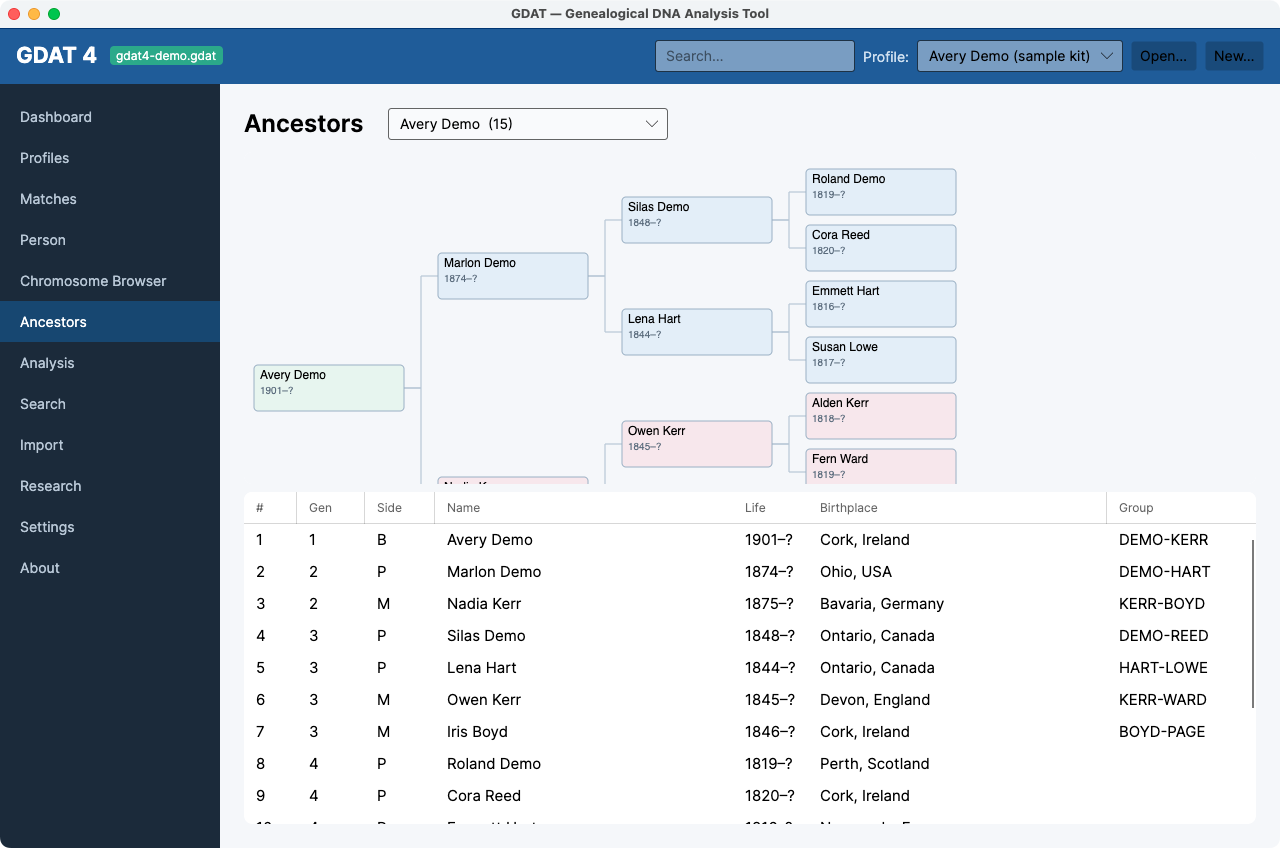
Ancestors shows a match's full ahnentafel plus a drawn pedigree chart. Pair it with the segment tools to connect DNA to a specific line.
A practical loop
- Cluster your matches to isolate a branch.
- Check Surnames and MRCA for a candidate common couple.
- Triangulate to confirm the branch shares real overlapping DNA.
- Use Group Compare and Ancestors to verify the line in each tree.
- When you're confident, confirm and document the MRCA.