Release Notes
Release 2026r02 Beta 2
Note that you may need to deactivate your virus protection to install these files
Windows 2026r02 Beta Mac 2026r02 Beta
- Fixed changes to An source for F12 page
- Add Relative: Rewrote function to manually add relative, segment or ICWs.
- Changes to improve loading of F5 ICW page
- Added option on F5, F7, F8 pages to italize relative names that may be a duplicate
Release 2026r01
Note that you may need to deactivate your virus protection to install these files
This release involves changes to the database structure to support separate ICW and Segment data. It will require running the ICW Conversion routine on the Options (F10) page. Backup first and use in-memory journaling (F10).
- Upgraded XOJO to release 2025r3.1
- ICW imports will now add Relative to database if not found. Selecting 'Use Current Profile' on the import data template will add a profile link to the current profile for new relatives. Otherwise will work as before.
- Triangulation imports will now add Relative to database if not found. Selecting 'Use Current Profile' on the import data template will add a profile link to the current profile for new relatives. Otherwise will work as before. It is recommended to add ICWs first so Relative name is populated.
- The Pedigree Thief ICW template has been changed to also import relative names
- Mods to support MyHeritage html changes on F12 and other pages that open MH web pages. See F12 page for details.
- F1 Relative page - Moved right click option to populate MRCA Note with MRCAs to the MRCA Note box.
- F5 ICW Analysis - Added tick box to hide relatives with no tree or not sharing status. Bold the # of segments if segment data is actually available rather than just reported. Add display relatives sharing or not sharing selected relative's segments.
- F8 Relative List - Added ability change relative status and open relative web pages from list as well as eliminated unused right click functions. Fixed issue with right click on blank page causing abend.
- F12 Web Copy/Paste - Segments import will now summarize cMs by Profile
- Added a ? link for each page to open associated user guide web page
- Fixed issue with Windows version being truncated
- Added optional feature to highlight associated groups on F2 page. Must run F10 database routine 'Create Associated Groups Table' to populate the database. Ocassionaly rerun this routine to keep up associated groups up to date or update as you go using right click option on the ahnentafel.
- Added functions to Chromosome Browser to Open Browser pages, mark status and filter relatives with New status
- Updated F12 page for html changes to An source. Can no longer collect notes.
- Added import of ICWs with blank names for An source to F12 page
- Removed Add Relative function as it is obsolete. Either use F12 or create your own data import templates
- Updated to pick up blank names on An source
Save a backup of your 2025r04 database as you cannot revert back due to changes in the database structure!
Release 2025r04
Note that you may need to deactivate your virus protection to install these files
Added functions to ICW Analysis page and updates to F12.
Release 2025r03
Note that you may need to deactivate your virus protection to install these files
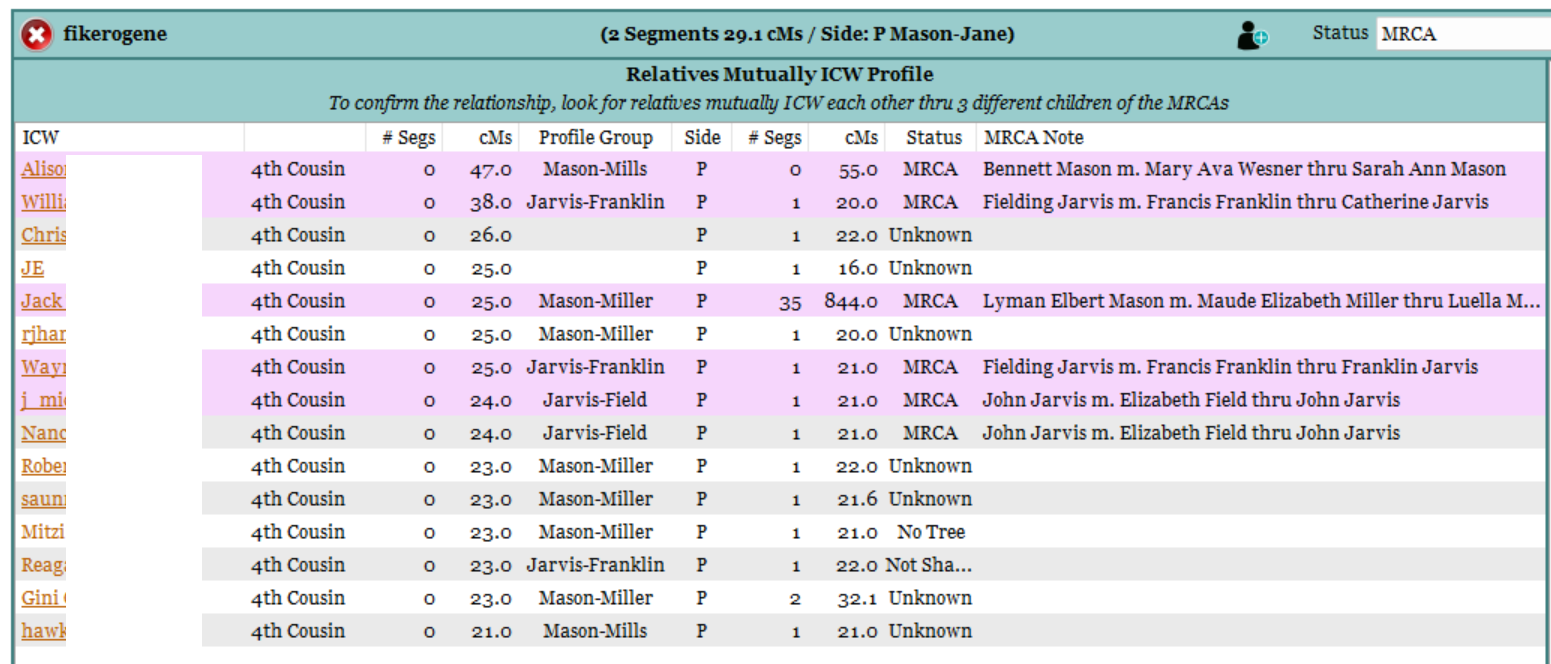
In this release, a new page is being provided for ICW Analysis (F5). For any given relative, it will display the relatives mutually in common with the Profile selected. Select a relative and use the right click option 'Display Relatives Mutually ICW' to identify what relatives are mutually ICW each other (highlight purple). Repeat and analyze. Look for common ancestors between the purple highlighted ones. Ideally, finding 3 relatives descended from 3 different children of the MRCA will confirm the MRCA. Example below.
For Windows users, a new page is being provided to Copy/Paste Web data (F12) for 23, An, FT and MH source codes. The purpose is to copy and import information about an individual relative match. It is not intended to be a mass import function but a tool to assist in the analysis of a cluster of mutually ICW relatives. Use with caution as web pages can change. Verify the displayed data before adding it to the database and as always, File-Backup before beginning.
Release 2025r02
Note that you may need to deactivate your virus protection to install these files
Fixed issue with ICWs not being displayed correctly on F4. Note that the cMs values listed on F4 are those in common with the Profile selected. To see the cMs between relatives, click on the Add/Edit icon on the Relative page.
Release 2025r01
Note that you may need to deactivate your virus protection to install these files
Updates
- Fixed issue on F1 where hitting + on Research notes erased data
- Fixed issue where adding icw without selection of a relative caused an abend
- On F8, removed Toggle MRCA/User Defined option when displaying Searches as this uses different functions
- Added F3 back to menu
Additions
- On F6, added ability to link Research and Parental Confirmation documents to all profiles with the same group name
- On F1, added the right click option to copy the MRCA path to research notes
- On F5, added an option to mark a relative name as having been reviewed as a duplicate and on F8, show duplicate names has the option to exclude those so marked.
- Added Pedigree Thief data import templates
- Added DNAGedcom Standard data import templates in prep for when those become available
- Added data import templates to support new DNAGedcom Extract tool (see below).
DNAGedcom Extract Beta
This beta tool is being made available to extract data from the DNAGedcom.db in a format compatible with GDAT. It has been tested with DNAGedcom.db files back as far as 2020 and is working correctly on my files. There are data import templates in F11 that will support the output. Prior to use, be sure to backup the DNAGedcom.db file and your GDAT database. Post any issues in the Facebook users group.
Release 2024r03
- In group analysis, bolded group names shared with profile's ahnentafel
- Family Comparison now available only thru top menu as it is a legacy item rarely used
- On F8 the maximum slider allows values up to 7200
- GedMatch Tier 1, 1 to Many import templated updated
- Can now edit the total cMs, # segments and largest segment from the F8 page. Data imports may change these values.
- On F4, right click option Mark Family Group Values will update the side even if the group value is blank
- Fixed issue with Advanced Search not recognizing an all profiles search selection
Given the unavailability of segment downloads, this will be the last release unless segment data again becomes available.
Release 2024r02
- Fixed Mac issue on not being able to add segments
- Add privatize to Add Relative function
Release 2024r01
Updated the Add Relative Functionality
To Add a Relative
- Select profile then click Menu ‘Relative-Add Relative‘
- Type in relative name, key value, select source then click Save button
- Use the drop-down menu at the bottom to attach relative to any other profiles
For Each Profile
With segment data, right click and add segments between profiles and relative. Without segment data, add total cMs, # segments and largest segment, if desired, by clicking on each cell and entering a value then click the ‘+’ to update database.
For Non-profile Relatives
To add non-profile relatives as ICWs, enter their key and ICW’s name in the bottom boxes and click Add ICW button. With segment data between the two relatives, right click and add segments. Otherwise, enter the total cMs, # segment and largest segment if the information is available.
Other Features
- Tabs can be used to move between cells
- Can delete or modify segment values
- Can delete ICWs
- Use the New button to add another relative to the current profile
- Double click on an ICW relative to switch to its view
- Selecting a relative will show to what profiles it is attached
- Family groups for the current profile can be modified by clicking on their cell and changing the contents
Release 2023r07
- Fixed issue with GedMatch Tier 1 not updating email address on existing relatives
- Added right click option to F10 Options page on False Positive Table to add False Positive Segments to Chromosome Browser (F7) and Map (F9)
- Added background highlight to F6 on column 1 to indicate the presence of a Research document
- Added right click signature option to Document Ancestor Research page
- Fixed right click Timeline error
- Add MRCA Relative List to Parental Confirmation page. Right click top box.
- Made some minor changes to the gedcom file import process including checking for version 5.5.1. Most issues loading gedcoms are due to having a child assigned to multiple parents. There is no way for GDAT to determine the correct parents.
- Add text boxes for range on F8 Relative list
Release 2023r06
- Fix issue with F8 slider updating wrong F10 value
- Fixed column issue with non Tier 1 template column assignments
Release 2023r05
- Upgraded the filter on F8 (Relative List)
- Modified GedMatch import templates. Note the change in 1 to Many templates. Use the free tools - 1 to Many Original version and Tier 1 - 1to Many Classic version. Neither imports email addresses. However, the Tier 1 Segment Search will now add email addresses unless they change that as well. It is recommended that Tier 1 users skip the 1-to-Many import and just use the Tier 1 Segment Search and Triangulation imports.
Release 2023r04
- Fix issue with changing colors on the Mac
- Fixed issue with abend on F9 right click not on selection
- Added ability to privatize to F9 relative names
Release 2023r03
- Reworked Segment Map (F9) to improve performance
- Added MRCA filter to Chromosome Browser (F7)
- Added ability to change map colors to Chromosome Browser (F7)
Release 2023r02
- Added right click option to Ahnentafel to copy descendants to clipboard
- Fixed issue with import ahnentafel window not resizing correctly
- Fixed issue where changing a blank group on the F6 page, changed all blank groups to the new name
- On F8, can now edit the User Defined field
- Added relative count to Surnames Analysis Tool
- Added right click option to 'Compare X to Current Profile' for GedMatch keys (lower right corner of F4)
- Made the F4 function to show relationship persistent
- Added right click option to Surname Analysis page to display ancestors of selected relatives
- Fixed issue where largest segment was being replaced when import value was zero
- Fixed issue where not all relative records were being deleted in F10
- Tested import templates. Small revision to Tier 1 One to Many showing which function to use.
Release 2023r01
- Profile to Relative relationship can now be edited from the F1 screen
- Added right click option to go to GedMatch page to compare relative key to profile
- Fixed issue on F4 where Show all ICW was ignoring side buttons
- Added side to group compare page
- Added 529Renew to Quick Start template
- Tweaked the MRCA analysis pages to display based on side associated with selected item
- Added import template for MyHeritage Ahnentafels
- Added bolding of surnames icw current relative on Surname Analysis page
- Added right click option on Relative List to toggle between MRCA notes and User Defined relative field
- Data import templates will now automatically have the option to record import stats set to true
- Segment data from Triangulation imports will not be merged with existing data but will be added if the segment is not found. This is to avoid merging data that may have been estimated. A new import error message to reflect this change is 'Segment Skipped'.
- On Family Comparison (F3), the default list for surnames in common is now the family group assigned and if none then the side assigned. Right click the box to select other options.
Release 2022r09
- Revamped the Add Relative page to link existing relative to current profile and added largest segment cMs. This page can be used to edit this information for existing relatives.
- Fixed issue with F8 where relative list not sticky when moving page to page
- Fixed issue with place names not allowing '-' character
- Added templates for 529Renew
- Tested all supported data import templates. If you have an issue, reactivate the template.
Release 2022r08
- Addressed GEDMatch formatting changes plus some minor issues reported by users. Be sure to deactivate and reactivate template to get latest changes.
Release 2022r07
- Tweaks to chromosome analysis page plus fix for the recent crashes.
Release 2022r06
Navigation
- Use up/down arrows to move between pages
- Use right/left arrows to move between relatives on relative pages
Chromosome Analysis
- Sort is by Side, Start Point, Generation, End Point
- Made the partition fields editable
- Added right click option to high light in yellow segments that have been confirmed
DNA Comparison (F4)
- Added side display options
Import Data Templates
- Add option to not record import stats for profile (default is to record)
Merge
- After merge, reverted back to selecting merged relative name
Search
- Added option on basic search to include only relatives with segment data
- Made the option profile only and relatives with segment data persistent
Relative List (F8)
- Changed Relative List drop down to say 'Select Segment Group'
Bug Fixes
- Fixed issue of notes disappearing when automatically adding status change
Release 2022r05
Database Routines
The focus of this release was to modify the database routines (F10) to display progress at the bottom of the page for most functions. Because these routines can run a very long time, the ability to abort by holding the ESC key down was also added. Two new routines were added:
- Remove all ICW data
- Delete Relatives without Chromosome data
Profile Page
There may be cases where segment and ICW information were not linked to a profile. This may be due to merges and I tweaked the merge process to hopefully correct. To see if any of your profiles are affected, go to the profile page (ctrl-p) and use the right click option 'Link Segments to Profile' for each profile.
Source Code
I have also posted the source code for this release.
This source code is being provided as is for those who wish to modify it for their personal use, not for profit or commercial use.
This version was developed on XOJO 2020r1.2. The only difference between this code and the Official 2022r05 GDAT code is that this code works on an unencrypted database. Users must first export an unencrypted database from the official version if they wish to use an existing GDAT database. The Official version of GDAT will not support unencrypted databases in order to ensure database integrity.
I will continue to provide support and enhancements to the Official version of GDAT and anyone may submit code changes to me to consider for inclusion in subsequent releases of the Official version.
Becky Mason Walker
14 May 2022
Release 2022r04
This release includes quite a few items that I think will be useful.
Manage Surnames - This page has been revamped so it should be easier to enter and delete names that xojo may not process correctly.
Relative Ahnentafel (F2) - This page will bold common profile surnames, regions and groups. There are two new right click functions. One to update location names to a standard location format, if possible and one to remove entries listed as Private but not connected to any ancestors. There is also a couple of new bolding functions.
Relative Family Comparison (F3) - This page will now display regions in common with the current profile. More about regions below.
Region Cluster View - Listed under MRCA menu. For some time I have wanted to do something with location data as it is often an important clue in identifying MRCAs. Terminology differs between countries so it was decided that a regions will be made up of 3 parts. In the US this would be county, state, country but can be any 3 divisions regardless of what they are called locally. Use the right click option on this view to setup Regions of Interest from the Profile's ahnentafel. This page will display all of the relatives having the selected region in their ahnentafel.
Cleanup Ahnentafel Location Names (F10) - This is a database routine to update all ahnentafel location names to a standard format, if possible. Under control settings set 'Reformat Location Names' to true. When set to True, GDAT will automatically reformat location values to the standard format, if possible. To test if this works for your locality, use the right click option on the F2 page to do just one as a test. Always Backup Up so you can restore your database if the results are not to your satisfaction.
Remove ICW's not Associated with a Segment (F10) - This is an optional database routine to remove any of a Relative's ICW data where the ICW is with a Relative that does not share the same segment with the Profile person. Confused? It is difficult to explain but let me try. On the DNA comparison page (F4) and in the right hand panel, you can select Show ICW Relatives on the Same Segment. Personally, these are the only ones I care to track as they are more indicative of a MRCA but if you select Show All ICW Relatives, the list can be quite long. I removed almost 2 million of these from my database to help improve performance. To keep the database clean, there is also a database option 'Load Only ICWs Shared with a Profile Segment'. Be aware that setting this to True will cause ICW imports to run longer but since I only import new data every 3-4 months, it is worth it. Again, backup your database if you decide to try this.
Bug Fixes - Truthfully, I do not track these but just fix them as they come up. If you reported one, you know to check to see if the issue has been resolved. Let me know if it needs further attention.